Our partners didn't just show up... They brought games!
Click each logo, to find a hidden gem, brought to you by the people who made this event possible.
Let’s Make This Worth Your Time
It's a wrap for this year!
HUGE thanks to our partners, speakers, and incredible community!
Catch the replays now before they’re gone in 7 days and locked until Web Agency Summit 7 next year!
Usually, connectivity issues are a result of improper set up of the microphone and the camera on your device and browser. Follow these steps to get this sorted:
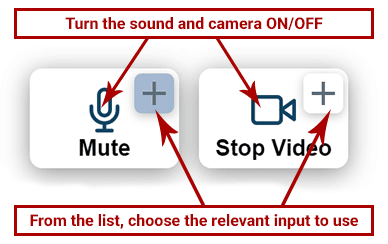
Option 1: Check the 2 Connection Buttons (mic/camera) Within the Video Window:
Make sure your microphone and camera are turned on from the icons. If you still can’t speak or broadcast video, click the little arrow icons to choose a different min/camera from your device.
OR
Option 2: Check the Sound and Video Settings Within the Browser:
In the address bar within your browser (Where the link to the page sits. Above this window).
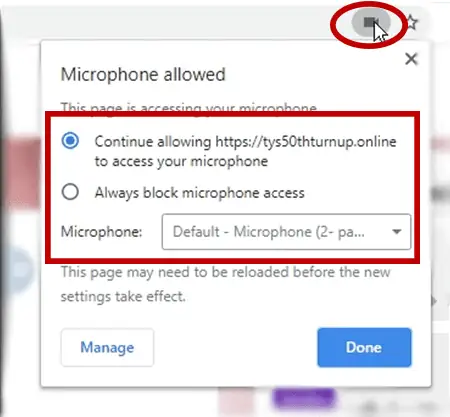
Click the microphone or camera icon (on the right-hand side of the address bar). Make sure you’re allowing the camera and microphone to work and choose the relevant mic and camera inputs from the list.
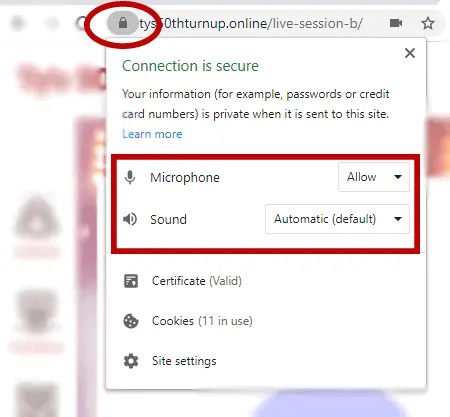
Within the same URL bar, on the left side, click the padlock icon and make sure sound and video are allowed on this website.
Then, refresh the page.
OR
Option 3: Visit The Hangout Lounge for Further Assistance
If you’re still having issues connecting, please visit the Live Video Support Channel and post a comment in the Chat. Someone from the team will help you.