Why Clients Leave, and What Hosting Has to Do With It

Clients do not care whether the problem is your fault if their site is slow, down or insecure. Simeon Mitev from HostArmada will show how hosting quietly shapes client trust, retention and recurring revenue. You’ll compare three paths: avoiding hosting, reselling it, or fully owning the experience. Join if you want to turn infrastructure from a hidden risk into a stronger business model.
Having trouble connecting? Try these options:

Usually, connectivity issues are a result of improper set up of the microphone and the camera on your device and browser. Follow these steps to get this sorted:

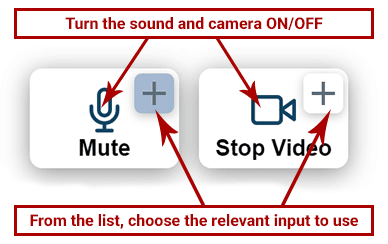
Option 1: Check the 2 Connection Buttons (mic/camera) Within the Video Window:

Make sure your microphone and camera are turned on from the icons. If you still can’t speak or broadcast video, click the little arrow icons to choose a different min/camera from your device.

OR

Option 2: Check the Sound and Video Settings Within the Browser:

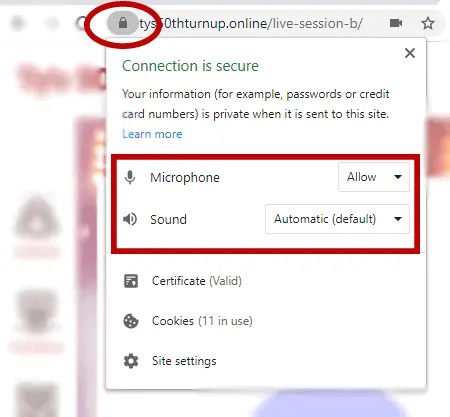
In the address bar within your browser (Where the link to the page sits. Above this window).

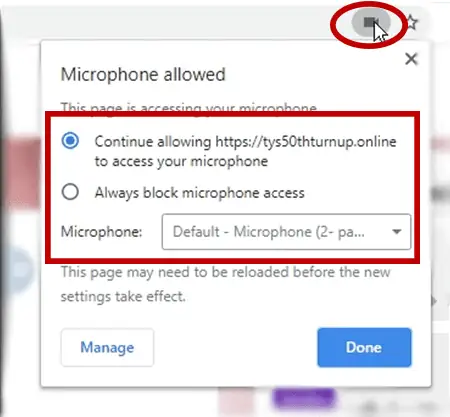
  • Click the microphone or camera icon (on the right-hand side of the address bar).
    Make sure you’re allowing the camera and microphone to work and choose the relevant mic and camera inputs from the list.
  • Within the same URL bar, on the left side, click the padlock icon and make sure sound and video are allowed on this website.

Then, refresh the page.

OR

Option 3: Visit The Hangout Lounge for Further Assistance

If you’re still having issues connecting, please visit the Live Video Support Channel and post a comment in the Chat. Someone from the team will help you.