The Custom Website Trap: How to Productise Your Web Projects

Custom web projects can quietly eat your margin, your calendar, and your will to open another content-chasing email. Alison Rothwell from VA Homepage will show how she turned WordPress delivery into a productised website service for a clear niche. She’ll break down the onboarding, templates, automation, and content systems that make delivery faster and less stressful. If every project feels like starting again from zero, this session shows how to make your offer easier to sell and easier to scale.
Having trouble connecting? Try these options:

Usually, connectivity issues are a result of improper set up of the microphone and the camera on your device and browser. Follow these steps to get this sorted:

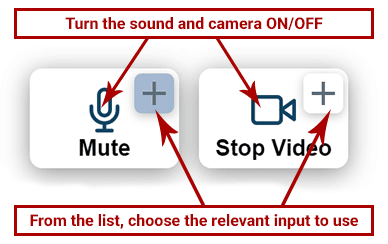
Option 1: Check the 2 Connection Buttons (mic/camera) Within the Video Window:

Make sure your microphone and camera are turned on from the icons. If you still can’t speak or broadcast video, click the little arrow icons to choose a different min/camera from your device.

OR

Option 2: Check the Sound and Video Settings Within the Browser:

In the address bar within your browser (Where the link to the page sits. Above this window).

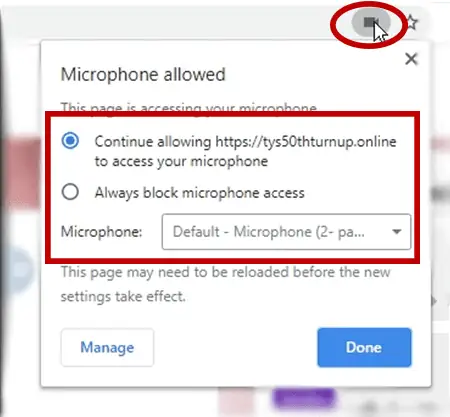
  • Click the microphone or camera icon (on the right-hand side of the address bar).
    Make sure you’re allowing the camera and microphone to work and choose the relevant mic and camera inputs from the list.
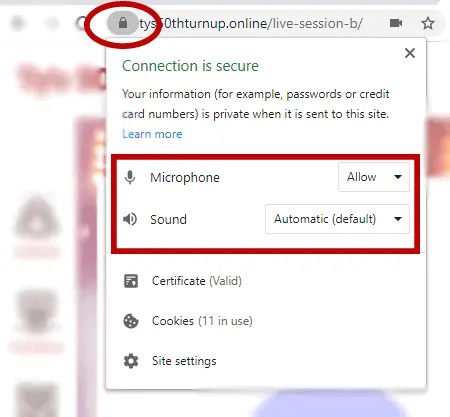
  • Within the same URL bar, on the left side, click the padlock icon and make sure sound and video are allowed on this website.

Then, refresh the page.

OR

Option 3: Visit The Hangout Lounge for Further Assistance

If you’re still having issues connecting, please visit the Live Video Support Channel and post a comment in the Chat. Someone from the team will help you.