Start Selling Accessibility: How Agencies Can Turn Compliance into Recurring Revenue

Accessibility should not be a panic project after a legal scare. Amber Hinds will show how agencies can turn audits, remediation and monitoring into a service clients understand and keep paying for. You’ll learn how to sell accessibility as ongoing value, not just a compliance checkbox. Go for practical ways to grow recurring revenue while making client sites work for more people.
Having trouble connecting? Try these options:

Usually, connectivity issues are a result of improper set up of the microphone and the camera on your device and browser. Follow these steps to get this sorted:

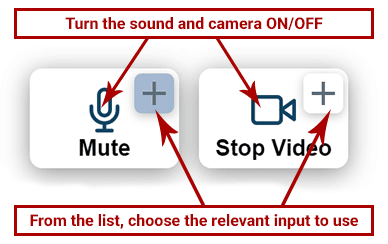
Option 1: Check the 2 Connection Buttons (mic/camera) Within the Video Window:

Make sure your microphone and camera are turned on from the icons. If you still can’t speak or broadcast video, click the little arrow icons to choose a different min/camera from your device.

OR

Option 2: Check the Sound and Video Settings Within the Browser:

In the address bar within your browser (Where the link to the page sits. Above this window).

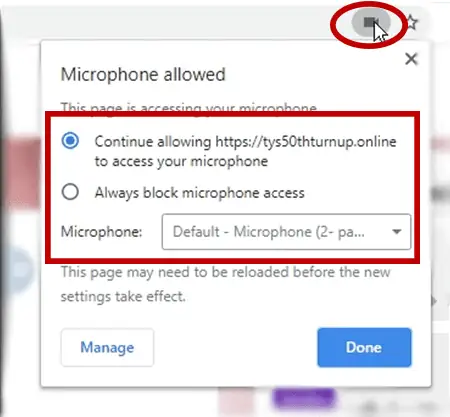
  • Click the microphone or camera icon (on the right-hand side of the address bar).
    Make sure you’re allowing the camera and microphone to work and choose the relevant mic and camera inputs from the list.
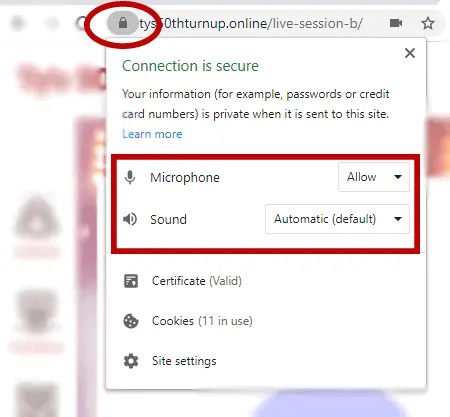
  • Within the same URL bar, on the left side, click the padlock icon and make sure sound and video are allowed on this website.

Then, refresh the page.

OR

Option 3: Visit The Hangout Lounge for Further Assistance

If you’re still having issues connecting, please visit the Live Video Support Channel and post a comment in the Chat. Someone from the team will help you.